Among Shimano's 12-speed groupsets, the R9200 and R8100 series,
the disc brake levers ST-R9270 and ST-R8170
can be configured in a semi-wireless setup without routing cables down the down tube.
However, a defect has been confirmed with the ST-R8170
where it cannot communicate wirelessly with the rear derailleur.
The reason for this is that in the current 12-speed groupsets,
all the mode-switching buttons, charging ports, and wireless communication functions
that were previously distributed across the electrical components
have been consolidated into the rear derailleur.
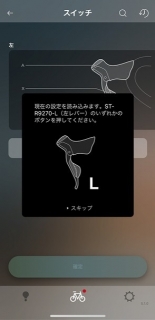
↑This is a screenshot I took for the article,
and it shows the R9270 lever, not the R8170,
but after registering it in the smartphone app
(meaning communication is established between the phone and lever),
when you try to send the button function assignment settings to the rear derailleur,
pressing any of the two buttons on the lever or the button on the upper part of the lever
(three buttons total)
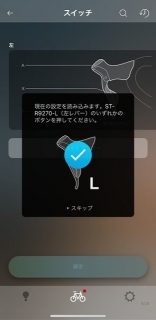
should display a checkmark like this.
However, with ST-R8170 units running firmware version 4.0.2 or earlier,
there are frequent reports where no checkmark appears no matter how many times you press the lever buttons,
and just the other day, one of the left levers on an ST-R8170 we were assembling at the shop exhibited this exact symptom.
Seriously, brand new and already a complete brick.
"Paperweight" is slang for an electronic device that's become non-functional—
in English it's commonly called a "brick,"
though it's sometimes also referred to as a "paperweight," which carries the same meaning.
When the checkmark doesn't appear, the only way to exit that screen
is to press the "▶ Skip" button shown in the image above,
but doing so doesn't save the settings, so pressing any button on the lever
won't move the front derailleur (assuming you had assigned front derailleur shifting to the left lever).
It won't budge at all.
And even if you want to update the firmware
to the latest version "4.0.3" at the time of writing this article,
since communication with the rear derailleur is impossible,
you can't perform the firmware update—
it's an absolutely ridiculous situation.
With a previous generation electrical groupset, you could connect to a PC using the SM-PCE1 unit,
and its successor, the SM-PCE02, allows wired connection to the lever for updates,
but because Shimano changed the connector standard for electrical groupsets on their own terms,
the old SM-PCE1 became unusable, and they're selling essentially the same functionality
with the SM-PCE02 for a list price of 26,002 yen (including tax)—
something most casual users would find completely unacceptable.
On top of that, as of when I'm writing this article,
the SM-PCE02 is out of stock at the manufacturer.
So what do you do about it?
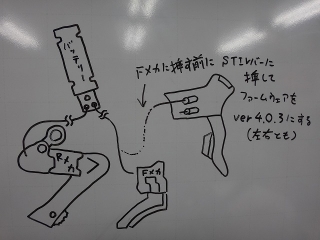
It turns out that if you connect the lever directly to the battery via wire,
the update becomes possible.
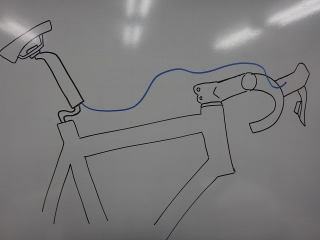
In the case I dealt with the other day, we'd already installed the groupset on the frame
and routed the cable through the disc brake, so
I removed the seatpost and connected the battery and lever with a different cable than what would be used for final routing (shown in the diagram above).
The battery has three ports, but when using wireless connectivity,
only two are used, so there should always be one port available.
After updating the firmware to version 4.0.3,
the front derailleur started responding to the left lever.
Since the lever was already paired with the smartphone, it wasn't a complete brick to begin with.
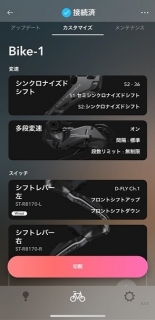
When you connect via wire,
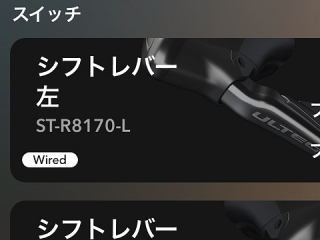
you see a "Wired" indicator like this.
The right lever was functioning normally on version 4.0.2,
but just because it works doesn't mean I was comfortable leaving it as-is, so I updated it to 4.0.3.
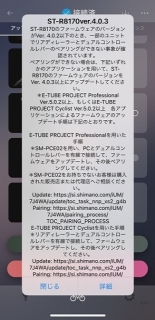
Recently, a caution notice like this has been displayed.
For those who are planning to build up with ST-R8170 in the future,
to avoid having to buy the SM-PCE02 or any extra cables you won't need on the final bike,
I recommend connecting the battery and rear derailleur before mounting the frame,
then plugging the cable that would go to the front derailleur into both the left and right levers,
and updating the firmware.
This way you don't need to buy any extra cables.
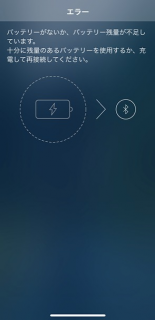
Batteries usually ship with insufficient charge to connect to the app,
and in that case a message appears on the phone telling you to charge it and try again.
The groupset side does properly alert you about low battery and prevent you from accessing further operations,
which is fine,
but (though I haven't personally witnessed it)
there have been reports that if your phone's battery dies during app configuration,
the groupset components can become bricked,
so it's best to avoid using the E-TUBE app when your phone battery is running low.
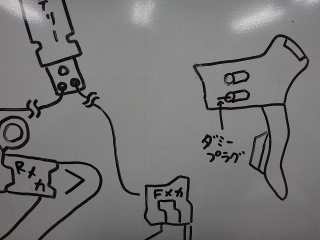
Also, both the ST-R9270 and ST-R8170
have two ports on the lever side,
but the upper port does not come with a dummy plug installed from the factory.
There may be cases where someone successfully assembled the ST-R9270 in semi-wireless mode so smoothly
that they didn't notice they forgot to insert a dummy plug in the upper port,
so if you're concerned, check it out.
the disc brake levers ST-R9270 and ST-R8170
can be configured in a semi-wireless setup without routing cables down the down tube.
However, a defect has been confirmed with the ST-R8170
where it cannot communicate wirelessly with the rear derailleur.
The reason for this is that in the current 12-speed groupsets,
all the mode-switching buttons, charging ports, and wireless communication functions
that were previously distributed across the electrical components
have been consolidated into the rear derailleur.

↑This is a screenshot I took for the article,
and it shows the R9270 lever, not the R8170,
but after registering it in the smartphone app
(meaning communication is established between the phone and lever),
when you try to send the button function assignment settings to the rear derailleur,
pressing any of the two buttons on the lever or the button on the upper part of the lever
(three buttons total)

should display a checkmark like this.
However, with ST-R8170 units running firmware version 4.0.2 or earlier,
there are frequent reports where no checkmark appears no matter how many times you press the lever buttons,
and just the other day, one of the left levers on an ST-R8170 we were assembling at the shop exhibited this exact symptom.
Seriously, brand new and already a complete brick.
"Paperweight" is slang for an electronic device that's become non-functional—
in English it's commonly called a "brick,"
though it's sometimes also referred to as a "paperweight," which carries the same meaning.
When the checkmark doesn't appear, the only way to exit that screen
is to press the "▶ Skip" button shown in the image above,
but doing so doesn't save the settings, so pressing any button on the lever
won't move the front derailleur (assuming you had assigned front derailleur shifting to the left lever).
It won't budge at all.
And even if you want to update the firmware
to the latest version "4.0.3" at the time of writing this article,
since communication with the rear derailleur is impossible,
you can't perform the firmware update—
it's an absolutely ridiculous situation.
With a previous generation electrical groupset, you could connect to a PC using the SM-PCE1 unit,
and its successor, the SM-PCE02, allows wired connection to the lever for updates,
but because Shimano changed the connector standard for electrical groupsets on their own terms,
the old SM-PCE1 became unusable, and they're selling essentially the same functionality
with the SM-PCE02 for a list price of 26,002 yen (including tax)—
something most casual users would find completely unacceptable.
On top of that, as of when I'm writing this article,
the SM-PCE02 is out of stock at the manufacturer.
So what do you do about it?
It turns out that if you connect the lever directly to the battery via wire,
the update becomes possible.

In the case I dealt with the other day, we'd already installed the groupset on the frame
and routed the cable through the disc brake, so
I removed the seatpost and connected the battery and lever with a different cable than what would be used for final routing (shown in the diagram above).
The battery has three ports, but when using wireless connectivity,
only two are used, so there should always be one port available.
After updating the firmware to version 4.0.3,
the front derailleur started responding to the left lever.
Since the lever was already paired with the smartphone, it wasn't a complete brick to begin with.

When you connect via wire,

you see a "Wired" indicator like this.
The right lever was functioning normally on version 4.0.2,
but just because it works doesn't mean I was comfortable leaving it as-is, so I updated it to 4.0.3.

Recently, a caution notice like this has been displayed.

For those who are planning to build up with ST-R8170 in the future,
to avoid having to buy the SM-PCE02 or any extra cables you won't need on the final bike,
I recommend connecting the battery and rear derailleur before mounting the frame,
then plugging the cable that would go to the front derailleur into both the left and right levers,
and updating the firmware.
This way you don't need to buy any extra cables.

Batteries usually ship with insufficient charge to connect to the app,
and in that case a message appears on the phone telling you to charge it and try again.
The groupset side does properly alert you about low battery and prevent you from accessing further operations,
which is fine,
but (though I haven't personally witnessed it)
there have been reports that if your phone's battery dies during app configuration,
the groupset components can become bricked,
so it's best to avoid using the E-TUBE app when your phone battery is running low.

Also, both the ST-R9270 and ST-R8170
have two ports on the lever side,
but the upper port does not come with a dummy plug installed from the factory.
There may be cases where someone successfully assembled the ST-R9270 in semi-wireless mode so smoothly
that they didn't notice they forgot to insert a dummy plug in the upper port,
so if you're concerned, check it out.